 Streaming platforms come in many shapes and sizes. One of the best we’ve found is Streema:
a streaming platform were music lovers can listen to their favourite
radio station. Streema has also introduced a mobile app called Simple
Radio that collects digital stations from around the world, based on
genre or location. Broadcast radio is alive and well – the difference is
that, compared to the FM giants of yester year, the term ‘broadcast’
has shifted. To make up for the turn of a radio dial, we have to find
several, savvy ways to make our online radio station discoverable and
this includes listing your station on Streema.
Jumping on-board, Streema will give your
programming a lot of exposure. So, here’s how to add your radio station
to Streema in five simple stages.
Step 1 – Ensure your song information is updated on Streema
Before approaching Streema, we suggest taking a look at the details of your playlist: the names of artists, songs and albums for every track. Many listeners like having this information in front of them. Streema users sometimes report confusion as to why they can’t see the song info, and you might as well give them the best experience.
With SAM Broadcaster, you are able to
add your track details manually within your station library. Do a quick
double check, though, to see that the track info is 100% present and
accounted for.
Step 2 – Make a request
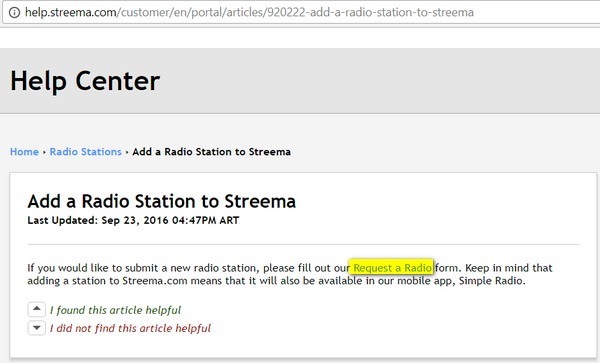
The actual process of uploading to Streema isn’t that clear on Streema’s homepage, so you have to make a detour to their Help Centre (help.streema.com). There, select ‘Add a Radio Station to Streema’, and click on the ‘Request a Radio’ link.
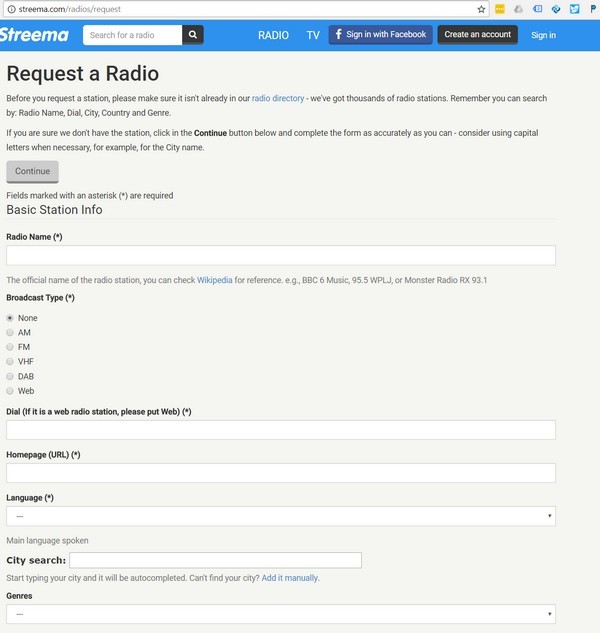
You will then be taken to a page that
will request that you check that the name of your radio station is not
already listed in Streema’s current directory. If you are sure that your
station is not already registered with Streema, press on continue.

Step 3 –Confirm the core station details
When you press continue, you will now be
taken to a request form. This is where you must outline the name of
your station, the language you’re broadcasting in, and what genres
you’re associating with. The latter section can also relate to a theme,
such as Brazilian, Travel/Tourism or Sports. Up to four can be selected.
At least one streaming URL has to be
given; there are options for two additional streams if you have multiple
channels or web platforms. The ‘type’ of broadcast is also important,
relating to digital streams and/or traditional broadcast methods i.e.
Web vs. FM.
Step 4 –Add your personal info & additional bits
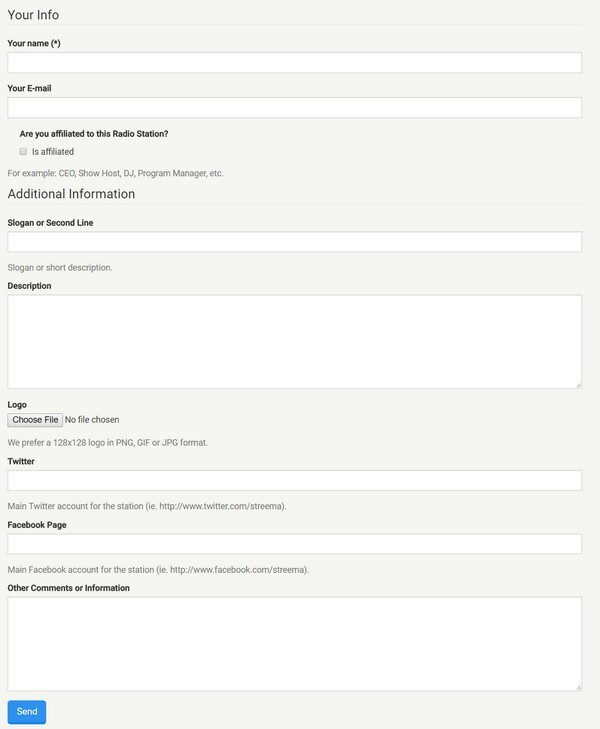
Within the same form, Streema will ask
for your name and email address. This will enable Streema to contact you
through via messages if you need to be aware of anything. The form also
wants to confirm whether you are directly affiliated with the station –
producer, radio DJ, presenter etc. – or acting on behalf of someone
else (perhaps, say, in an advertising capacity).
We’re at the end of the list now, and
all that’s left is to add the final contextual aspects of your station.
Upload your logo from a JPEG, PNG or GIF file, as well as any slogans
and descriptions you want to affiliate with the Streema player when it
goes live.
The Spacial team are a big advocate of
social media integration to help boost your exposure even further.
Streema has two inputs for Twitter and Facebook addresses, so you can
add your social links. Any other comments can be written in the final
section of the form, such as a warning for risqué content or days when
the station may be taken off-air periodically.
Step 5 – Submit the Station
Once you have entered and verified you
details, you can proceed and click submit on the form. Your details
will be submitted to Streema and you will get a confirmation message
that says “Thank you for requesting, we’ll be in touch soon.” It takes
3-5 days for your radio station to get listed on Streema.
And that, in a nutshell, is how to add
your radio station to Streema, a platform that (in more than one sense)
gives you access to your favorite internet radio stations.
If you still don’t have a radio station of your own, of course SAM Broadcaster Cloud
is still your best tool for that purpose. It is a simple, free way to
throw your voice out to the world. Tell us about your Streema journey as
the station makes its mark…
Source Link:- https://spacial.com/add-radio-station-streema/
